
Greenkeeping
Course condition reporting for members and greenkeepers
The people who find the problems on your course are already out on it. Caddyio lets a member report a course condition from the hole they're playing — photo, hole number and GPS position attached — and gives your greenkeeping team a single place to triage what comes in and publish notices back to everyone out there.
The connected member doesn't want to remember a bunker at the 14th until they reach the bar. They report it where they find it, and hear back where it matters — on the course.
The problem
Course problems are reported late, vaguely, or not at all
A member notices standing water on the 7th, means to mention it, and forgets by the turn. The ones who do report it describe it from memory at the bar — the wrong hole, no photograph, an hour later. Meanwhile the club has no way to tell the field that greens are being cored today, so the same question is asked forty times.
The response
Reported where it's found, answered where it's felt
From the round screen, a member reports a condition in a few taps: what it is, a photo, and the hole they're on — with their GPS position attached automatically. It lands in the greenkeeping inbox for your team to triage, and when there's something the field needs to know, staff publish a notice that appears on every player's round screen.
Why it matters
What a truly connected club gains
The report arrives with the evidence attached
A photograph of the actual bunker, the hole number, and the GPS position it was taken from. Your greenkeeper knows exactly where to go and what to bring, instead of walking eighteen holes looking for a description.
Your members become your early-warning system
A club has one greenkeeping team and a hundred golfers walking the course every day. When reporting takes ten seconds from the hole itself, the small things — a broken marker, a damaged flag, a divot bin gone — get reported instead of tolerated.
Notices reach the people already out there
Coring the greens, a temporary green on the 5th, a fairway closed after rain: publish it once and it appears on the round screen of everyone playing. The message lands where the golfer is, not in an email they read that evening.
A record of the course's condition over time
Every report and every notice is kept against the course. What was reported, when, what was done about it — a maintenance history that outlasts whoever happened to be on shift.
Report from the hole
Members report a course condition mid-round with a photo, the hole number and their GPS position attached automatically.
Staff triage queue
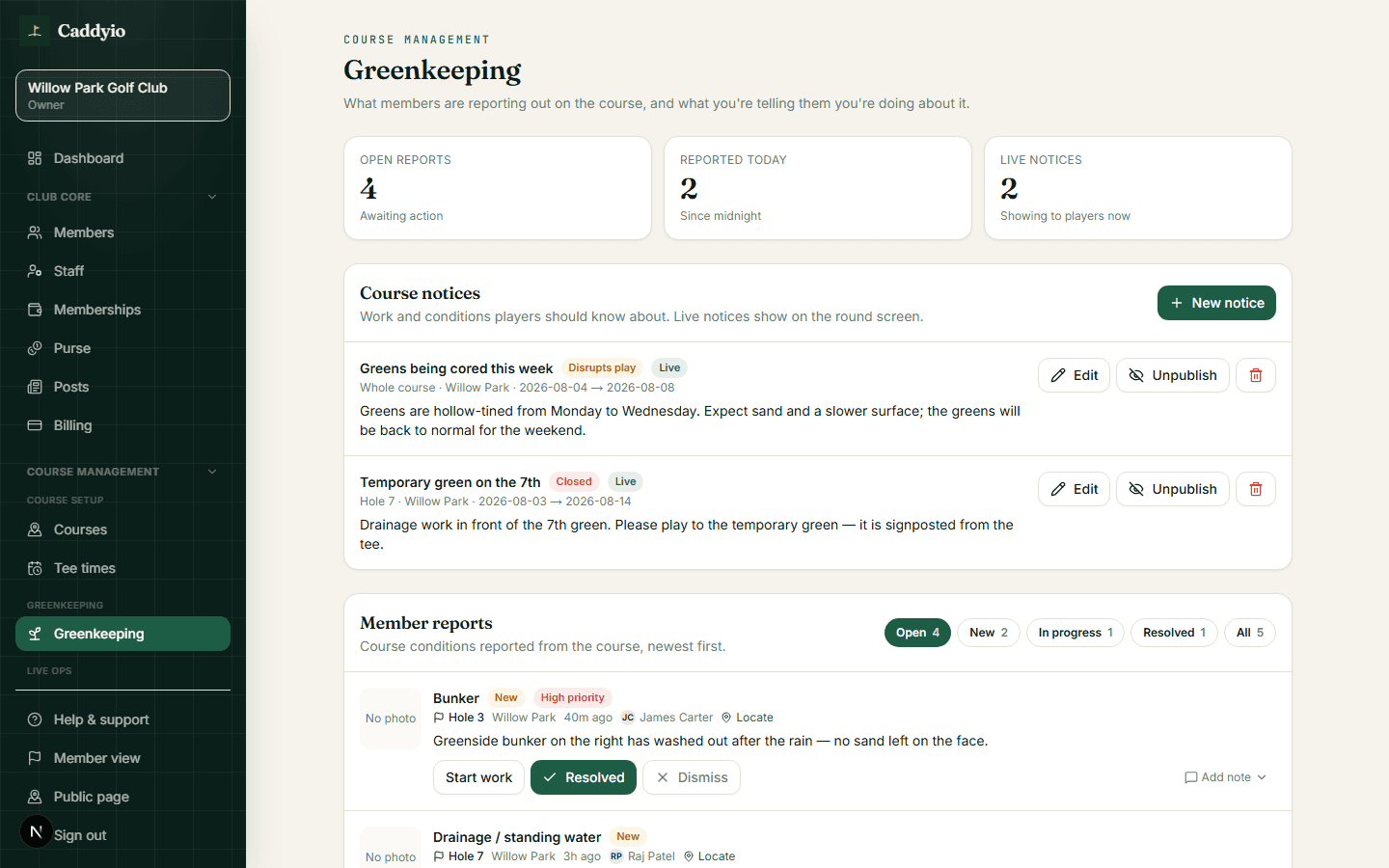
Everything reported arrives in one greenkeeping inbox for your team to review, prioritise and resolve.
Notices back to the course
Publish a course notice — maintenance, a temporary green, a closure — and it appears on the round screen of every member playing.
For your club
- Get course problems reported in the moment, with a photo and a location
- Work from one greenkeeping queue instead of second-hand messages
- Tell everyone on the course about maintenance without sending an email
- Keep a dated record of what was reported and what was done
- Stop the same question reaching the pro shop forty times a morning
For your members
- Report a problem in seconds from the hole you're standing on
- Attach a photo so the club can see exactly what you saw
- Know about coring, temporary greens and closures before you reach them
- See that the club actually acts on what members report
How it works
- 01
A member finds something
Mid-round, they open the report screen, pick what it is, add a photo and a note. The hole and GPS position are attached for them.
- 02
It lands with greenkeeping
The report appears in the staff greenkeeping queue with its photo and location, ready to be triaged.
- 03
The team acts
Staff work the queue, mark items as they're dealt with, and keep the history against the course.
- 04
The course is told
When there's something players need to know, staff publish a notice and it shows on the round screen for everyone out on the course.
The Caddyio difference
Greenkeeping is running a golf course, not a premium add-on
Reporting a washed-out bunker and telling players the greens are being cored is core to running a course, so it's core in Caddyio — switched on for every club, not sold as a module. It also sits in the same platform as the live course view and the member app, so a report knows which hole it came from and a notice knows who's out there to read it.
Compare the whole platformFrequently asked
- What can members report?
- Course conditions they come across while playing — standing water, bunker damage, a broken marker or flag, anything that needs a greenkeeper. They add a photo and a note, and the hole and GPS position are attached automatically.
- Do members need to be playing a round to report something?
- Reporting is built into the round screen, which is where a member is when they find a problem. That's also what lets the report carry the hole number and GPS position without anyone typing them in.
- How do members hear about maintenance work?
- Staff publish a course notice from the greenkeeping screen, and it appears on the round screen of every member playing — so the field finds out before they reach the temporary green, not after.
- Is greenkeeping an extra module?
- No. It's core and switched on for every club. Reporting course problems and telling players about maintenance is part of running a golf course, not an upsell.
Related features
All featuresOn-course service
On-course service and player safety
Members request refreshments, help or report a problem from the hole they're on — and because the club sees where they are, help arrives fast.
Learn moreCourse & pace
Course mapping, GPS and pace of play
Map your course once and unlock a live satellite view of play — GPS positions on the wallboard and pace-of-play tracking to manage slow play early.
Learn moreWallboard
Clubhouse GPS wallboard
Put a live GPS view of everyone on the course on your clubhouse screen — players moving over a satellite map of your real course, with leaderboards.
Learn moreMarketing & growth
Member communications & growth analytics
Send one message to the right audience over email, push and the club feed — and see which visitors are worth converting, which members have gone quiet, and where your tee sheet has room.
Learn more